How Private Pay Works: Pay Crypto Bills with fUSD
Pay a crypto bill in USDT, USDC, Bitcoin and more from the fUSD in your Zano wallet. The merchant sees Freedom Swap, not your wallet.
Paying a crypto bill usually means paying from a wallet the merchant can look up. On Ethereum or TRON, anyone who knows the address you pay from can see its balance and its whole history, and the checkout now knows it. If what you hold is fUSD, there's a second problem: a checkout that wants USDT on Ethereum, or Bitcoin, means a swap, a withdrawal to another wallet, and then the payment.
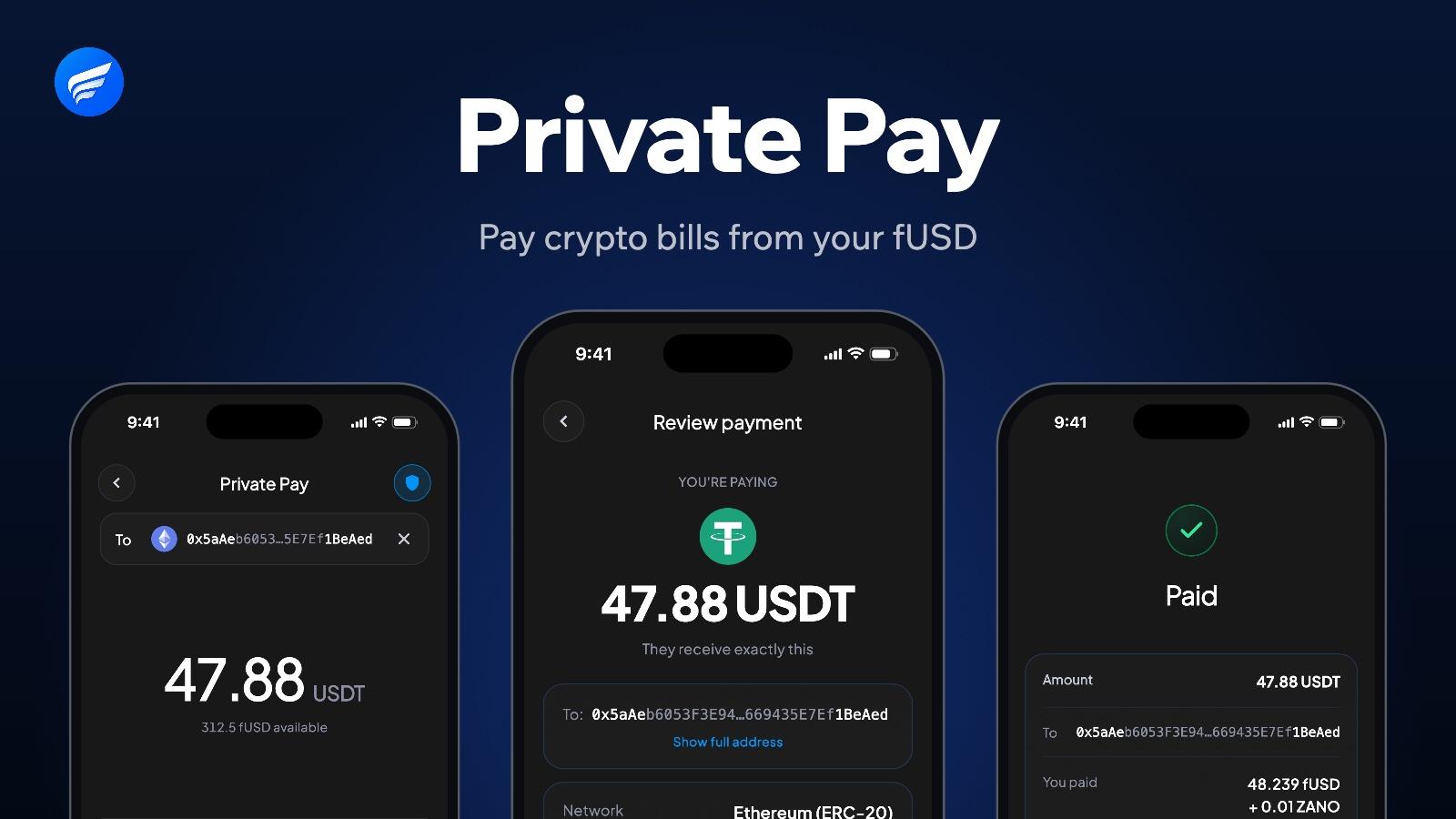
Private Pay pays a crypto bill from the fUSD in your Zano wallet. Scan or paste the bill, check one total in fUSD, and confirm. Freedom Swap, the swap service that handles fUSD conversions in the app, converts your fUSD and pays the merchant the exact amount the bill asks for, on the network it asks for. The merchant receives the payment from Freedom Swap, so your wallet's address, balance and history stay out of their view.
Private Pay is in Freedom Wallet 1.7.1 for iPhone, in Zano wallets, and is coming to Android. It runs on Freedom Swap, so it's offered only where the app offers swaps, which excludes some regions, including the UK.
The short version
- One total in fUSD. Before you confirm, you see what the merchant receives and what you pay: an fUSD total, plus Zano's network fee of 0.01 ZANO.
- The exact amount on the bill. If the bill is for 47.88 USDT, the merchant receives 47.88 USDT. When a bill asks for more decimal places than a token can be paid in, the amount is rounded up, never down.
- The merchant sees Freedom Swap, not your wallet. Your side of the payment is a private Zano transaction. The payout comes from Freedom Swap.
- USDT, USDC, ETH, Bitcoin, Monero and more. Private Pay pays tokens on Ethereum, USDT on TRON, and Bitcoin, Monero and Zcash addresses.
How to pay a bill with Private Pay
You'll need fUSD in a Zano wallet, plus a little ZANO for Zano's network fee. If your funds are in another coin, you can swap into fUSD in the app first.
1. Tap the shield in Send
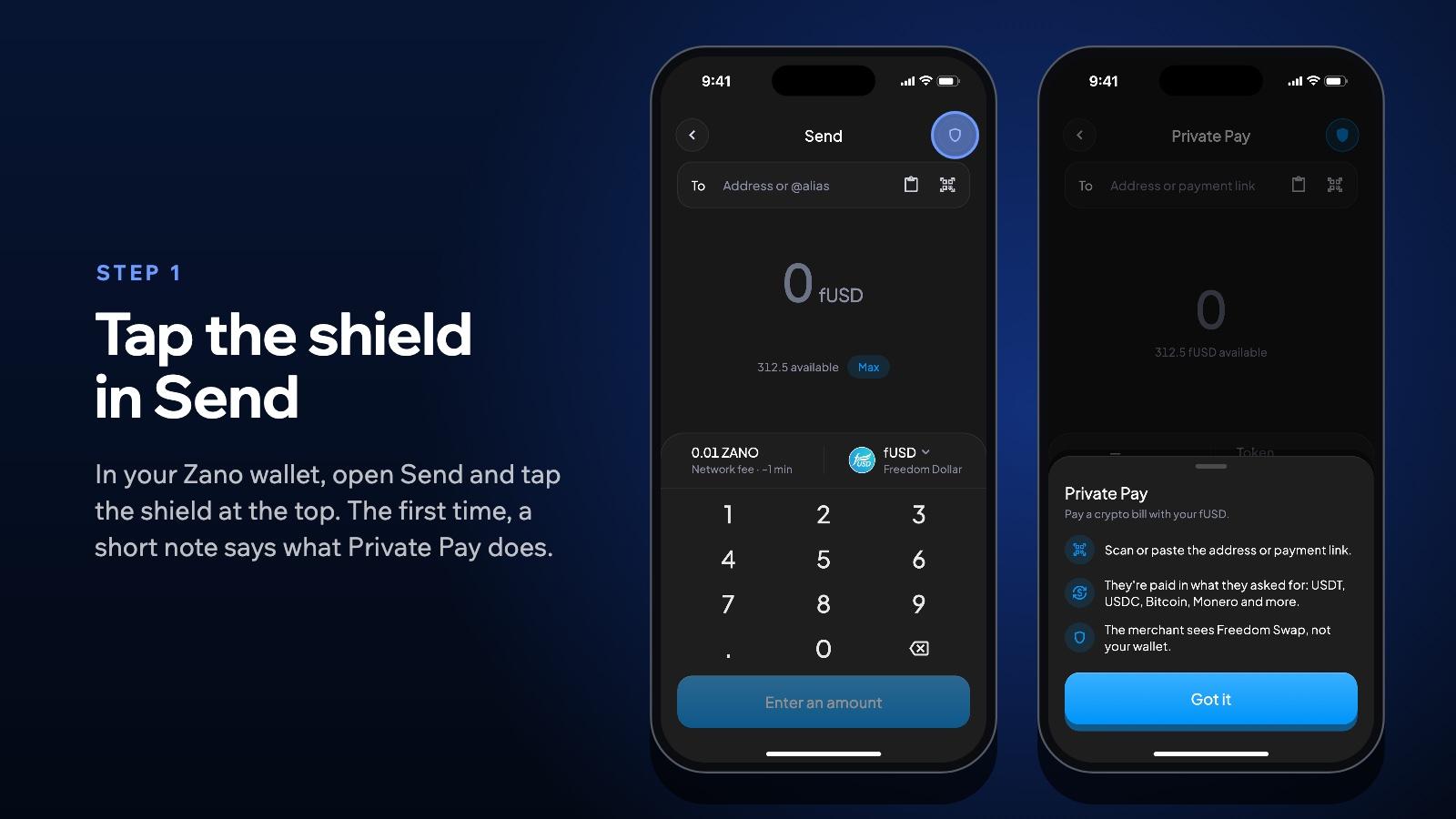
Open your Zano wallet, tap Send, then tap the shield at the top right. The screen becomes Private Pay. The first time, a short sheet explains what it does.
You can also skip the shield. Scan a bill from the normal Send screen, or paste an address from another network, and Private Pay opens by itself with the bill filled in.
2. Scan or paste the bill
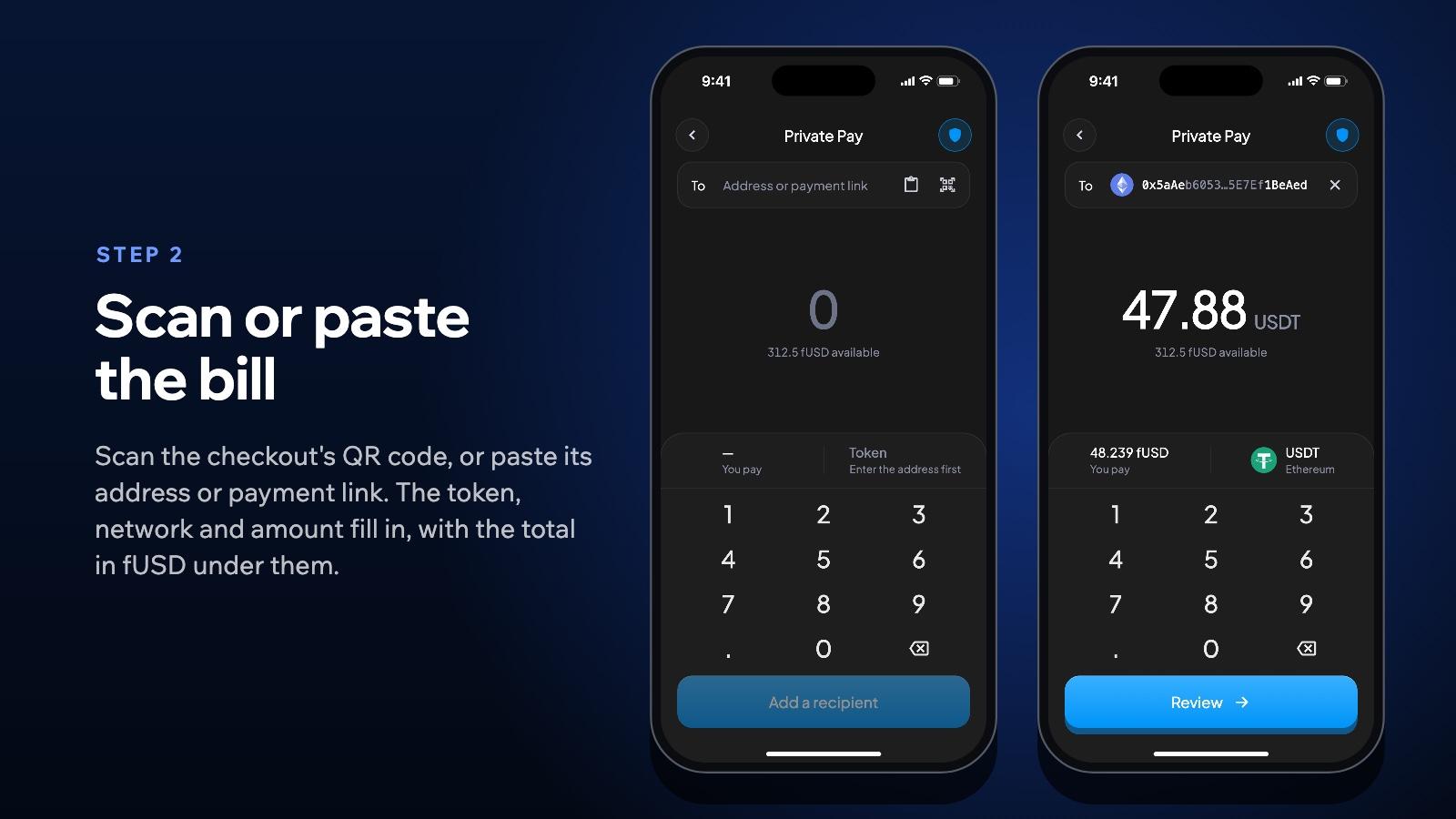
Tap the scan icon in the To field and point your camera at the checkout's QR code, or paste the address or payment link. Most checkout codes name a token and an amount, so the form fills in the token, its network and the amount. If you paste a plain address, pick the token the checkout asks for and type the amount.
The fUSD total appears below the amount, labeled You pay, beside the token and its network. It depends on the price at the time you pay, and the screenshots show one example.
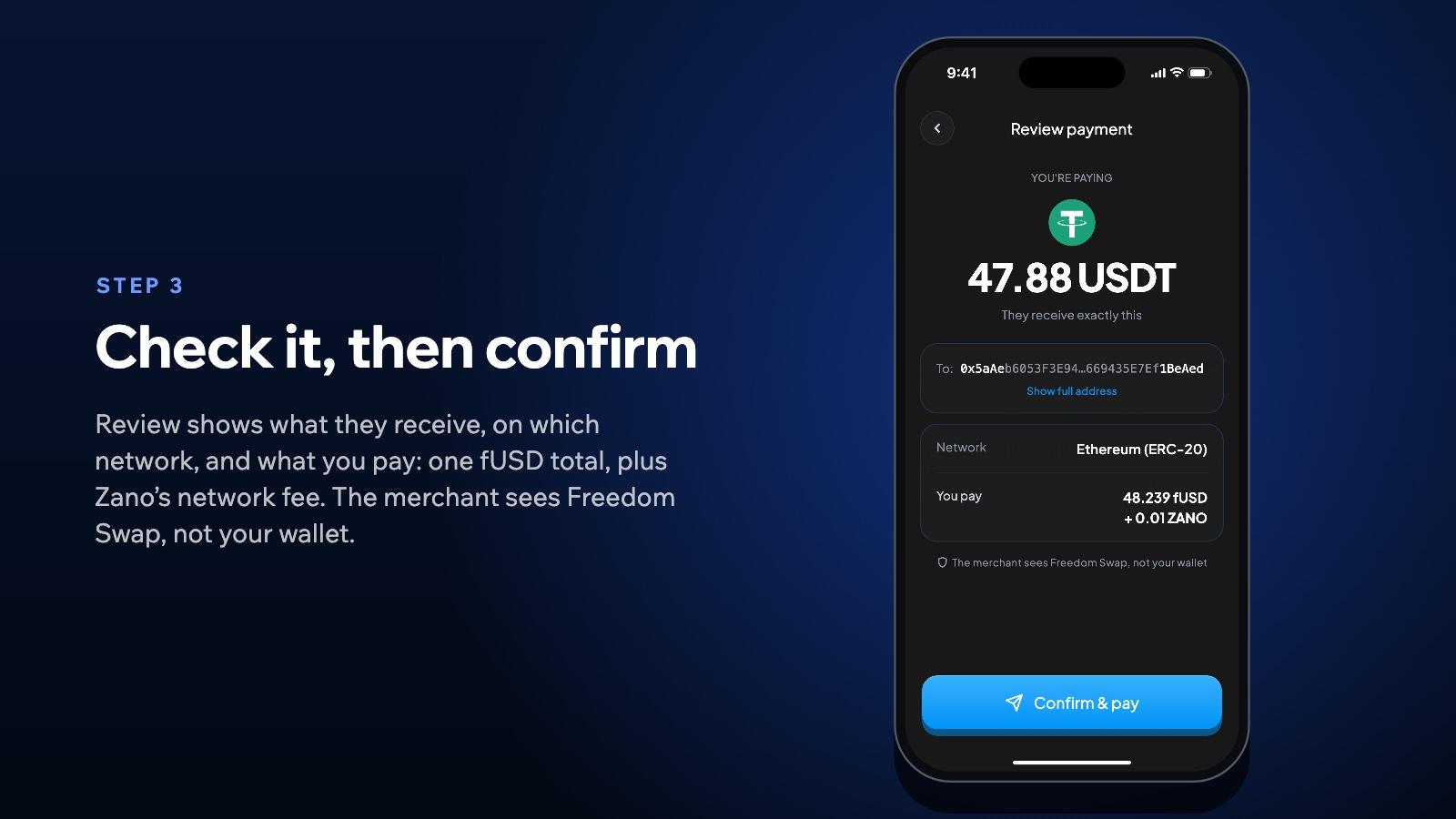
3. Check it, then confirm
Tap Review. The Review payment screen shows:
- the amount the merchant receives, with "They receive exactly this" under it
- the address it goes to
- the network, named the way checkouts name it, such as Ethereum (ERC-20) or TRON (TRC-20)
- what you pay: the fUSD total, plus 0.01 ZANO for Zano's network fee
While you're on Review, the price is refreshed every 30 seconds. When you tap Confirm & pay, the app checks that the price hasn't gone up since you saw it and that it has at least two minutes left to run. If either check fails, nothing is sent, and you see the new price to confirm again.
4. Follow it to Paid
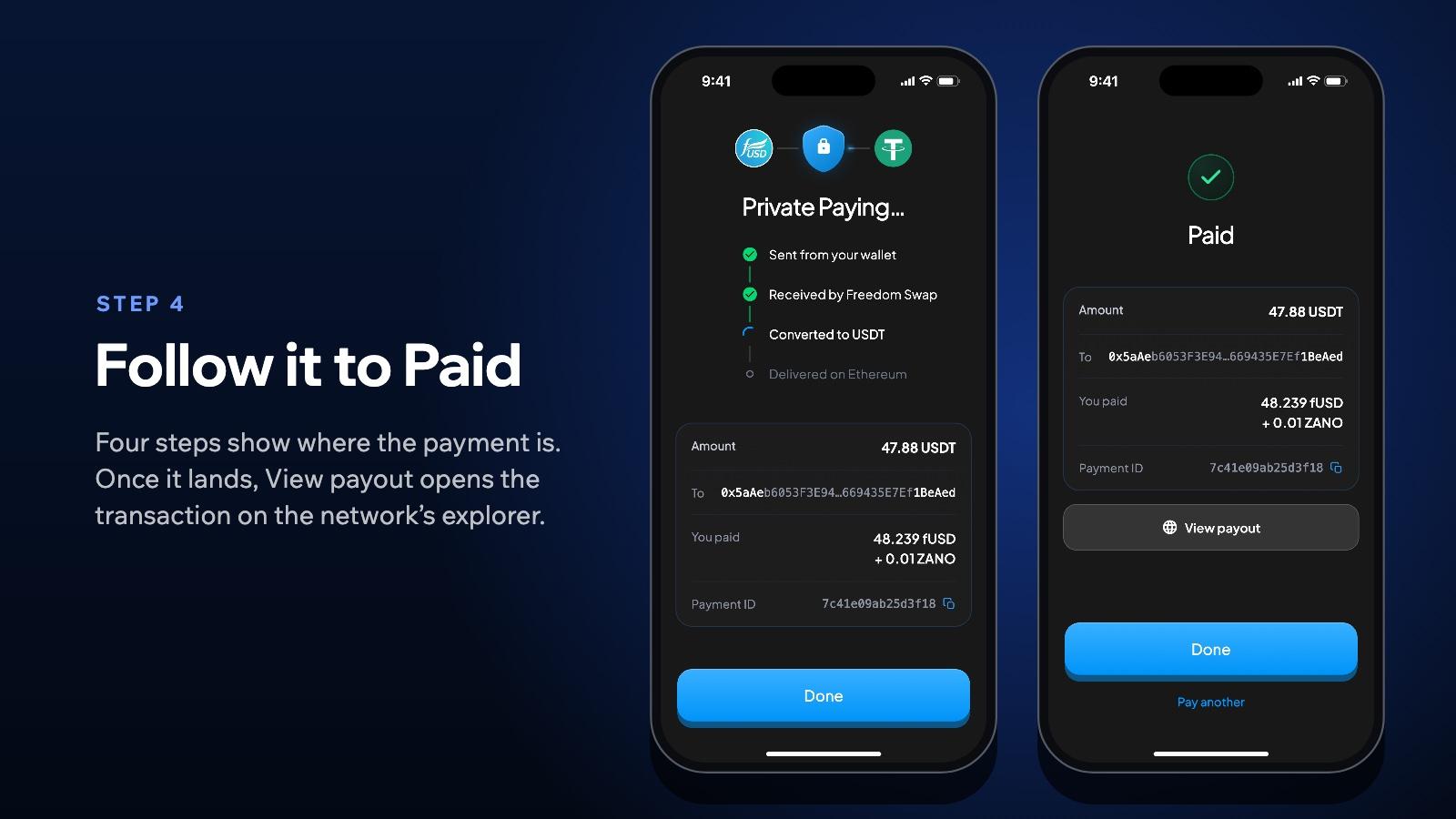
Once you confirm, the screen follows the payment through four steps: Sent from your wallet, Received by Freedom Swap, Converted to the token the bill asked for, and Delivered on its network. When the payout lands, the screen says Paid. View payout opens the payout on the network's block explorer, and Pay another starts a new payment.
What Private Pay can pay
| Network | What it pays |
|---|---|
| Ethereum | USDT, USDC, ETH, DAI, EURC, PAXG, WBTC, cbBTC and the other tokens listed in the app |
| TRON | USDT (TRC-20) |
| Bitcoin | BTC |
| Monero | XMR |
| Zcash | ZEC |
For every payout except native ETH and USDT on TRON, the merchant receives exactly the amount on the bill. For those two, Review says "They receive this, or a fraction more."
Each network has a smallest payment, and at times a largest, and a network's payouts can be paused for a while. When that happens, the form tells you before you reach Review.
What it can't pay
Private Pay stops a bill it can't pay exactly, and says why on the form:
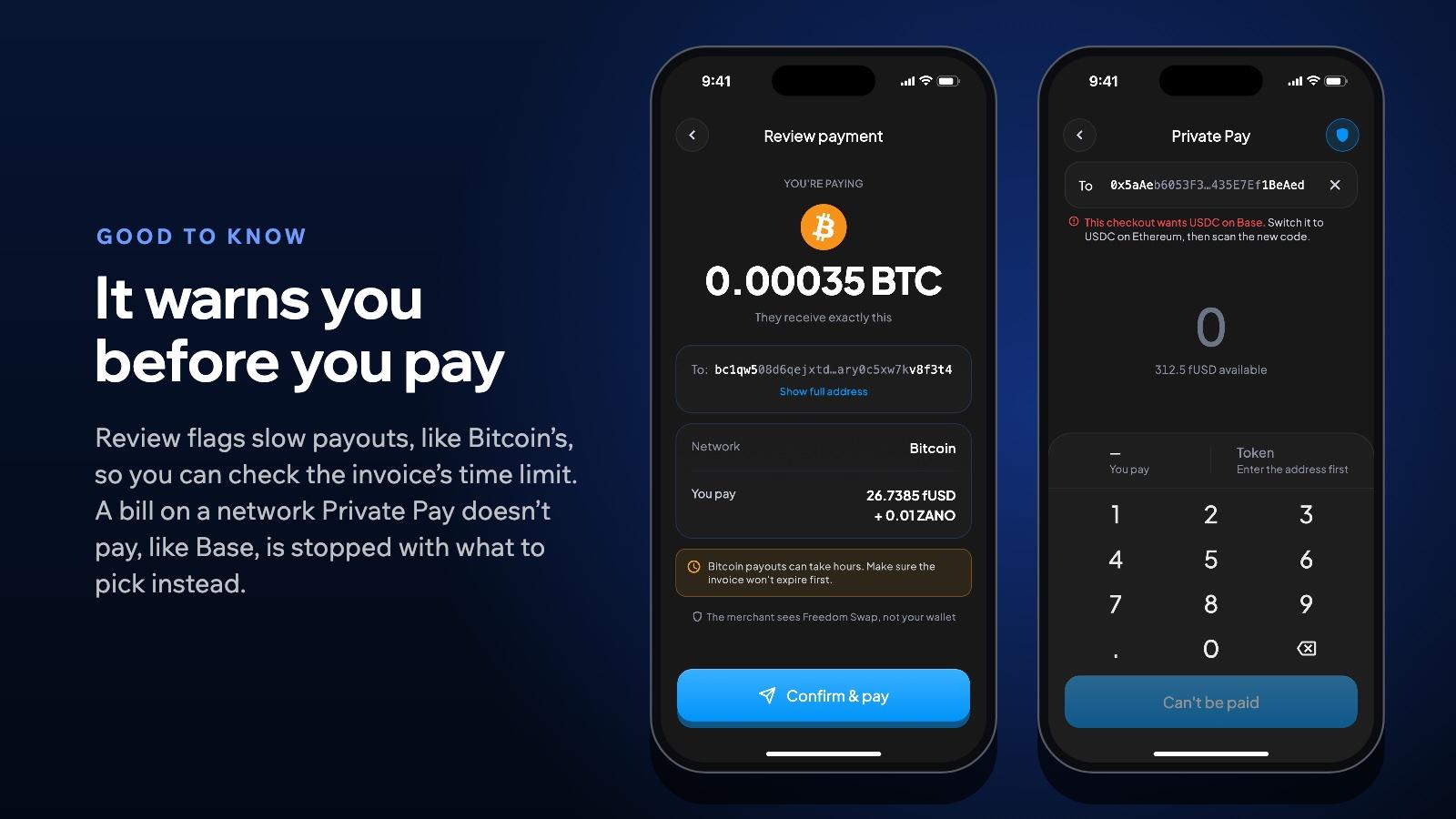
- Tokens on other networks. A checkout that wants USDC on Base, Polygon, Arbitrum, Optimism, BNB Chain, zkSync, Avalanche or Linea is refused, with a note to switch to Ethereum. Many checkouts let you change the network before they show the code.
- Tokens Freedom Swap doesn't pay out. Some Ethereum tokens, such as PayPal USD, can't be paid. Pick USDC, USDT, ETH or EURC if the checkout offers one.
- TRX. On TRON, only USDT can be paid.
- Solana and Bitcoin Cash. Private Pay doesn't pay on these networks.
- Requests that need more than an address and an amount. A code that calls a contract, or a Bitcoin, Monero or Zcash request with a memo, can't be paid, because the payout can't carry it. Ask the checkout for a plain address and amount.
- Zano addresses. Send pays those. Tap the shield to switch back.
How long a payment takes
Payouts on Ethereum usually land within a few minutes. Monero payouts take about 20 minutes. Bitcoin payouts can take hours, and Review tells you so before you confirm: "Bitcoin payouts can take hours. Make sure the invoice won't expire first."
Many checkouts give you a fixed window to pay, and some Bitcoin checkouts close after 15 minutes. Before you pay a Bitcoin or Monero bill, check how long the invoice stays open. If the checkout also takes USDT or USDC on Ethereum, that's usually the faster way to pay it.
What the merchant sees, and what stays private
- The merchant receives an ordinary payment on their network, sent by Freedom Swap. They don't see your Zano wallet, its address, its balance or its history.
- Your side is a Zano transaction. Zano hides amounts and addresses on its chain, so your fUSD transfer to Freedom Swap can't be read from the public chain.
- The payout is public on its network, like any payment on Ethereum, TRON or Bitcoin: anyone can see that Freedom Swap paid that address that amount. A Monero payout stays private on Monero's chain.
- Freedom Swap sees the payment it converts: the fUSD that came in and where the payout went. It needs both to make the payment.
- Freedom Wallet never holds your funds. Your keys stay on your device, and the fUSD leaves your wallet only when you confirm.
What the app itself collects is set out in our privacy policy.
Your records
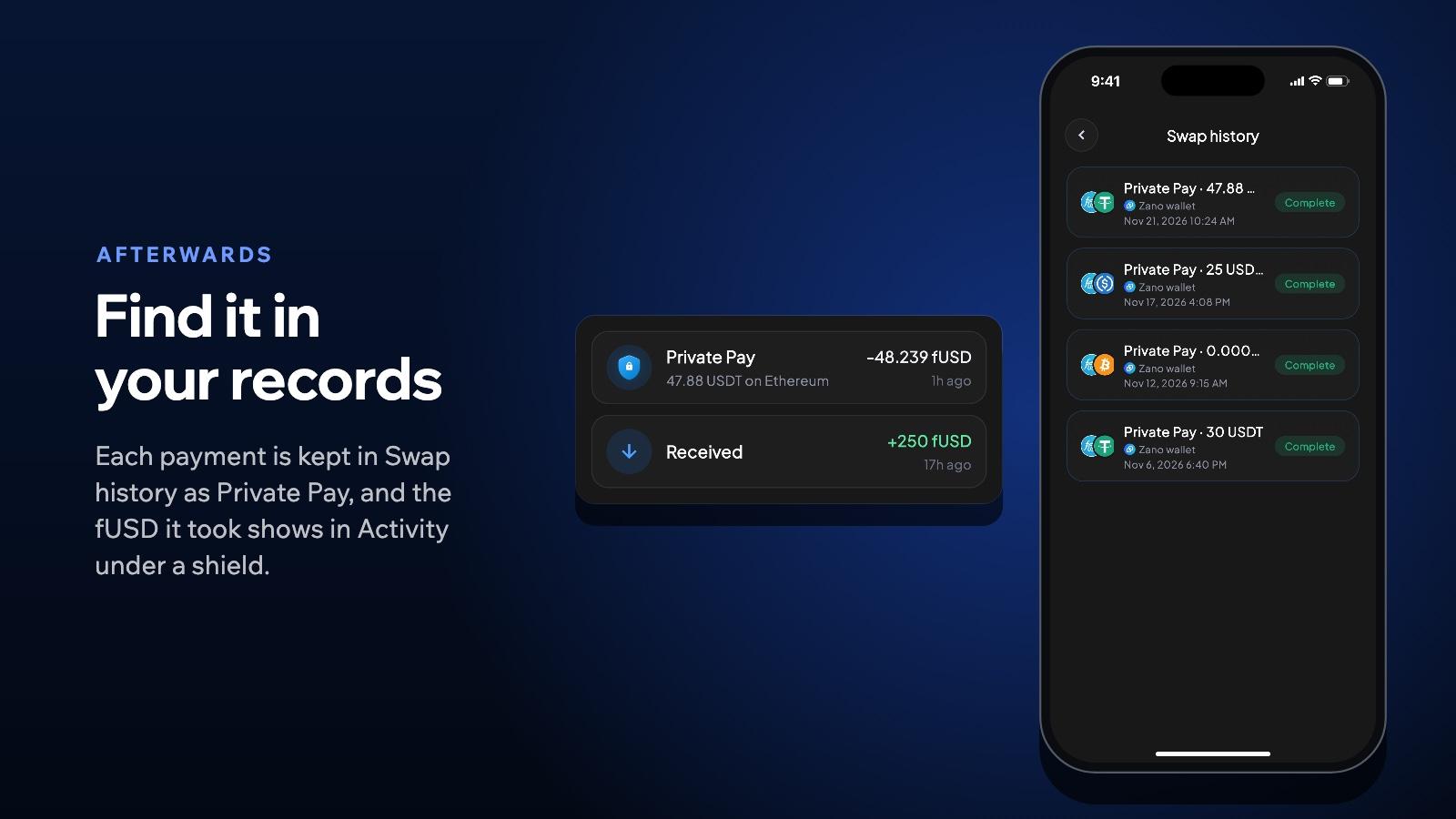
Every payment is saved in Swap history as Private Pay with the amount paid, such as "Private Pay · 47.88 USDT", and its status. In Activity, the fUSD transfer appears under a shield as Private Pay, with what it paid underneath, such as "47.88 USDT on Ethereum".
The payment screen also shows a Payment ID, which you can tap to copy. If you ever need help with a payment, it's what Freedom Swap support will ask for.
If something goes wrong
- If a payment can't go through and Freedom Swap sends the fUSD back, the screen says so: "The payment didn't go through, and your fUSD was sent back to your wallet."
- If it can't go through and nothing comes back, the screen asks you to contact Freedom Swap support with the details shown, including the Payment ID.
- If the network hasn't confirmed that your fUSD went out, the screen tells you not to pay again until it finishes, since paying again could pay the bill twice.
Coming soon: Private Pay for Monero wallets
We're bringing Private Pay to Monero wallets, so you can pay a USDT or USDC bill straight from your XMR. It will work the way it does in Zano wallets: scan the bill, check one total, confirm.
A Monero payment needs about 20 minutes of confirmations before it can be converted, so these payments will take longer, and the app will say so before you confirm. Until then, you can swap XMR into fUSD in the app and pay from a Zano wallet.
Common questions
Do I need ZANO to use Private Pay?
Yes, a little. The payment comes out of your fUSD, and Zano's network fee of 0.01 ZANO is paid in ZANO, as with any transfer on Zano.
Why is the fUSD total higher than the bill?
It covers converting your fUSD and paying the bill on the merchant's network. Review shows the full amount before anything leaves your wallet.
Can I send the merchant proof of payment?
Yes. On the Paid screen, tap View payout to open the payout on the network's block explorer, then copy the transaction link and send it to them.
Does the merchant have to do anything?
No. They receive the token they asked for, on the network they asked for, the same as any other payment.
Can I pay a BTCPay Server invoice?
Yes, as long as the invoice stays open long enough. Private Pay pays the exact BTC amount, but Bitcoin payouts can take hours, so check the invoice's expiry first. If the checkout also takes USDT or USDC on Ethereum, paying with that is usually faster.
Is Private Pay available everywhere?
It runs on Freedom Swap, so it's offered only where the app offers swaps. It isn't available in some regions, including the UK.
Keep your recovery phrase private
Private Pay never asks for your recovery phrase, and nobody from Freedom Wallet will. Anyone who asks for it, including someone claiming to be support, is trying to take your funds. Before you confirm a payment, check the address and network on Review: once a payout is delivered, it can't be reversed.
Private Pay is in Freedom Wallet 1.7.1 for iPhone, and is coming to Android. Get the app, open your Zano wallet, and tap the shield in Send.